Platform/Your computer
A Computer of Its Own, for Every Agent
Each agent works on its own desktop, with a browser, a terminal and files. It pauses when nobody is using it and comes back with its windows, programs and files as they were.
One computer, nobody else’s. Operator does its work there, so your own machine stays free and the files stay together.
A Real Desktop
Operator uses the computer the way you would: it looks at the screen, clicks and types.
A browser
It opens sites, fills in forms and reads what is on the screen.
A terminal
It runs commands and programs, and works on code in its own workspace.
Files
Add files to a task, and download what it makes.
Pauses, Then Resumes
A quiet computer costs nothing and loses nothing.
Pauses on its own
After a few idle minutes it pauses and stops using computer time.
Resumes as it was
The next task finds its windows, programs and files where they were.
Put away after a long rest
A computer left alone for 30 days is put away, and the files in its workspace are kept.
Yours to Control
See what it sees, and step in when you want.
Watch it live
The computer's screen sits beside the conversation while a task runs.
Take over
Hold the screen to sign in or fix something. Operator never asks for a password.
Pause or replace
Pause it now to stop using computer time, or start a fresh one with your saved files.
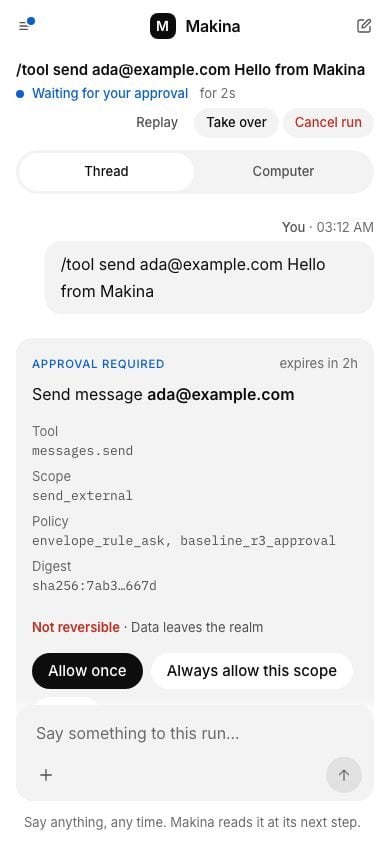
On your phone
The Same Computer, in Your Pocket
Where the Computers Run
On your own servers
In a private deployment, every agent's computer runs inside your own infrastructure, next to your systems and your data.
Private deploymentsWhat People Use It For
Research Across Sites
It opens each site in its own browser, reads what matters and keeps notes in its files as it goes.
See the use case about research across sitesBack-Office Work in Web Apps
It works in the web app the way a person would, in its own browser, one record at a time.
See the use case about back-office work in web appsDev Chores in a Terminal
It works in the terminal on its own computer: clones the repository, makes the change, runs the tests.
See the use case about dev chores in a terminalData Pulls and Reports
It collects the numbers, puts them in a spreadsheet on its computer and writes up what changed.
See the use case about data pulls and reportsMonitoring, With Approvals
Its computer keeps last time's notes, so each check compares against them. Start it when you like, or from your own scheduler through the API.
See the use case about monitoring, with approvals